
NeoVault
Challenge Scenario
Section titled “Challenge Scenario”This challenge involves identifying and exploiting Broken Object Level Authorization (BOLA) and Improper Inventory Management vulnerabilities.
The application is a banking platform that allows users to transfer funds and download their transaction history. The objective is to discover vulnerabilities within the application and ultimately retrieve the hidden flag.
By inspecting the application’s compiled JavaScript bundle (chunk.js), we can identify two versions of the API endpoints: v1 and v2.
let n = { endpointsV1: { me: "/api/v1/auth/me", login: "/api/v1/auth/login", register: "/api/v1/auth/register", logout: "/api/v1/auth/logout", changeEmail: "/api/v1/auth/change-email", transactions: "/api/v1/transactions", deposit: "/api/v1/transactions/deposit", balanceHistory: "/api/v1/transactions/balance-history", categoryPercentages: "/api/v1/transactions/categories-spending", downloadTransactions: "/api/v1/transactions/download-transactions" }, endpointsV2: { me: "/api/v2/auth/me", login: "/api/v2/auth/login", register: "/api/v2/auth/register", logout: "/api/v2/auth/logout", changeEmail: "/api/v2/auth/change-email", transactions: "/api/v2/transactions", deposit: "/api/v2/transactions/deposit", balanceHistory: "/api/v2/transactions/balance-history", categoryPercentages: "/api/v2/transactions/categories-spending", downloadTransactions: "/api/v2/transactions/download-transactions", inquireUser: "/api/v2/auth/inquire" }}Clean writeup — just needs tightening in a few places. Here’s the polished version:
Exploitation
Section titled “Exploitation”We begin by registering a new account and logging into the application.
Navigating to /dashboard/transactions reveals the current user’s transaction history, along with a Download PDF button that generates a transaction report.
The two relevant endpoints are:
GET /api/v2/transactions?page=1&limit=10POST /api/v2/transactions/download-transactionsThe download request is sent with an empty body, indicating the application relies solely on the JWT token to identify the user and generate the report.
Discovering the Improper Inventory Management Vulnerability
Section titled “Discovering the Improper Inventory Management Vulnerability”We probe the v1 endpoints identified earlier. Most return a deprecation notice:
GET /api/v1/transactions?page=1&limit=10{"message":"API v1 is deprecated, please use the new one instead"}However, the v1 download endpoint behaves differently:
POST /api/v1/transactions/download-transactions{"message":"_id is not provided"}Unlike its v2 counterpart, this endpoint expects an explicit _id in the request body rather than deriving the user identity from the JWT. This is an Improper Inventory Management vulnerability — a deprecated endpoint remains accessible and exposes functionality not present in the current API version.
Exploiting BOLA on the v1 Endpoint
Section titled “Exploiting BOLA on the v1 Endpoint”Supplying the _id of another user (neo_system) in the request body returns their full transaction history without any authorization check. This confirms a Broken Object Level Authorization (BOLA) vulnerability — the endpoint performs no ownership verification.
Reviewing neo_system’s transactions reveals transfers involving an account named user_with_flag.
Obtaining the user_with_flag ObjectID
Section titled “Obtaining the user_with_flag ObjectID”Since the v1 endpoint accepts any _id, retrieving the flag reduces to obtaining the _id of user_with_flag.
To obtain this identifier, we navigate to /dashboard/transfer, where users can transfer funds to other accounts. The transfer form includes fields for the recipient username, transfer amount, description, and transaction category.
After entering user_with_flag as the recipient and filling in the remaining fields with arbitrary values, a confirmation modal appears. The modal displays the recipient username, transfer amount, and transaction description.
Meanwhile, in the background, the application sends a request to the inquireUser endpoint to retrieve information about the specified recipient.
The response contains the recipient’s _id, which can then be used with the vulnerable v1 endpoint to download the user’s transaction history.
GET /api/v2/auth/inquire?username=user_with_flagRetrieving the Flag
Section titled “Retrieving the Flag”With the _id of user_with_flag in hand, we supply it to the vulnerable v1 endpoint:
POST /api/v1/transactions/download-transactions
{"_id": "<user_with_flag _id>"}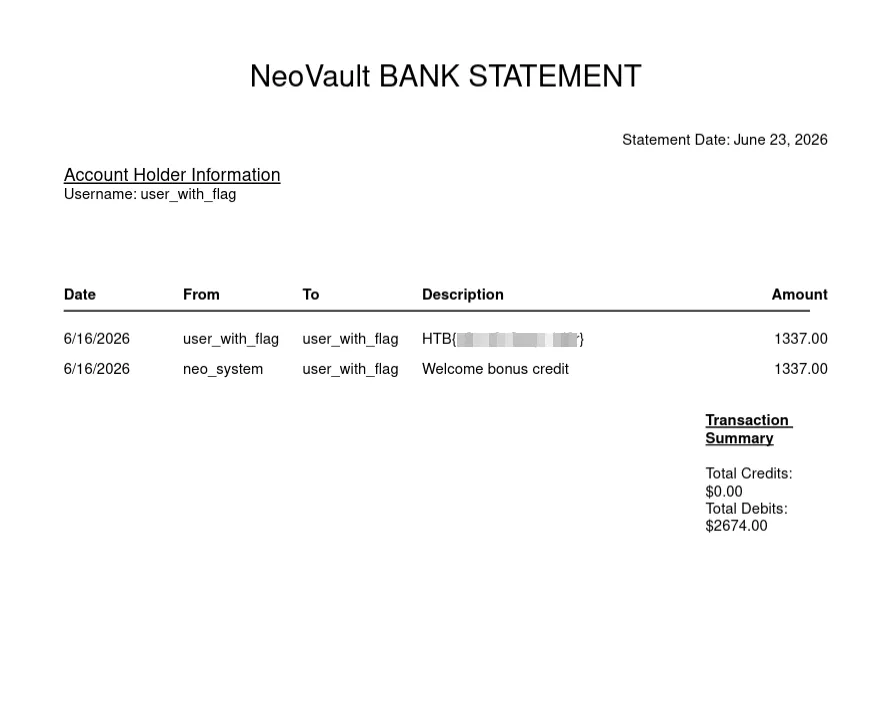
Analyzing the MongoDB ObjectID
Section titled “Analyzing the MongoDB ObjectID”The _id values returned by the API are MongoDB ObjectIDs — 12-byte (24 hex character) values with a predictable structure:
4 bytes — Timestamp (Unix epoch, big-endian)5 bytes — Machine ID + Process ID3 bytes — Random counterFor example, the two ObjectIDs observed from the API:
6a39e0fd b2aa45b33c 5ced2e6a39e182 b2aa45b33c 5ced3d└──┬───┘ └────┬────┘ └──┬─┘Timestamp Machine+PID CounterThe first 8 hex characters encode a Unix timestamp:
int("6a39e0fd", 16) # → 1782178045int("6a39e182", 16) # → 1782178178| ObjectID prefix | Unix Timestamp | UTC Time |
|---|---|---|
6a39e0fd | 1782178045 | 2026-06-23 01:00:45 UTC |
6a39e182 | 1782178178 | 2026-06-23 01:02:58 UTC |
The two IDs are 133 seconds apart. Notably, the machine and process identifier segment (b2aa45b33c) is identical in both, confirming they were generated by the same application instance.
Since the timestamp and counter components are sequential and predictable, we can use mongo-objectid-predict to enumerate ObjectIDs generated within a given time window — making it possible to predict the _id of the user_with_flag account if we know any ObjectID produced by the same process.